Limitless Survivor Keyboard & Mouse
PC bindings, movement tips, and crystal pickup after Controls Improvement.
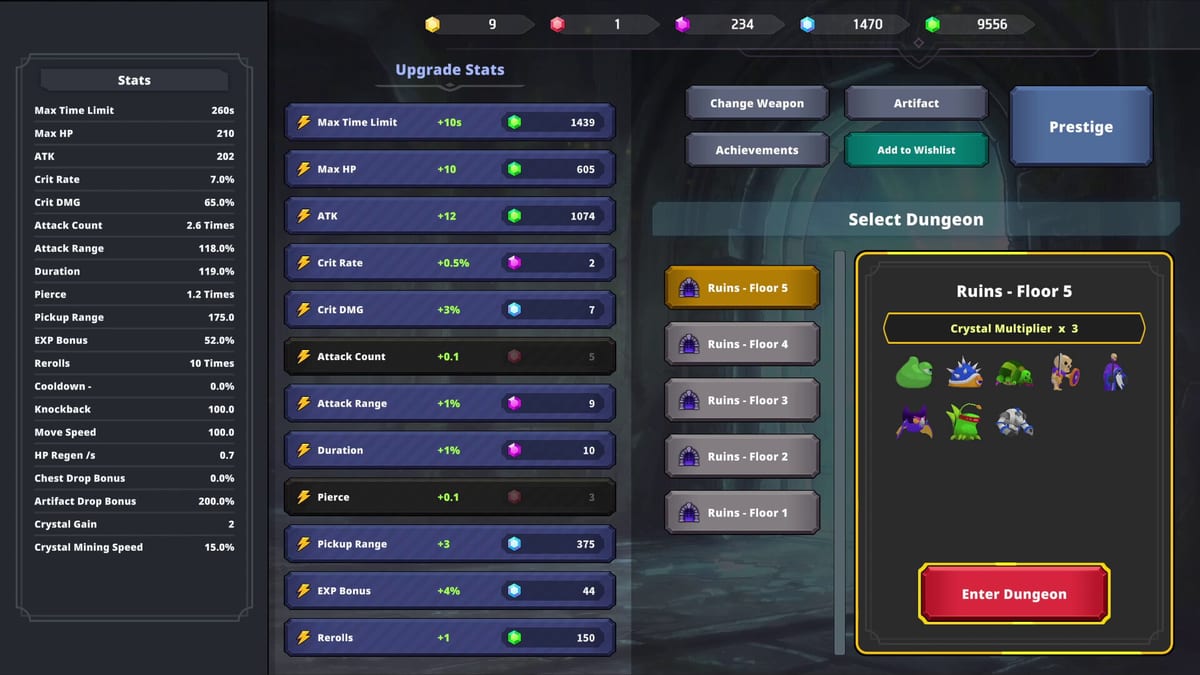
Limitless Survivor on Steam targets keyboard-and-mouse players first: WASD or arrow movement, mouse aim where applicable, hotkeys for skills and menus, and toggles for auto-play that define how much of a run plays itself. Tam Lab’s 1.0.03 Controls Improvement patch tuned responsiveness after launch feedback about floaty movement — a sense that direction changes take a beat to register — and about awkward crystal pickup sweeps when prestige resets leave pickup range under-leveled.
This page documents practical PC controls, how they interact with incremental systems, and habits that reduce deaths when auto-play dodging fails. Compare with Controller and the Controls Hub overview.
Default movement and combat
Movement uses standard PC FPS/arpg conventions. Your character continues auto-attacking or executing equipped skills based on loadout rules while you steer. Up to five skills can fire on cooldowns or triggers depending on build — see Best Builds — meaning keyboard players often focus on positioning rather than rhythm-game inputs.
Mouse functions vary by skill type: some builds ignore aim entirely, others benefit from pointing toward elite packs before firing area skills. Even when aim matters little, mouse control helps click UI elements quickly between runs — spending crystals, buying prestige tiers, reviewing Artifacts.
Rebinding, if supported in menus, should prioritize comfortable movement keys and an auto-play toggle within finger reach. Long sessions of AFK farming still need instant manual control when bosses telegraph one-shots auto-play ignores (Auto-Play Guide).
Auto-play toggle and hybrid play
Auto-play is central to Limitless Survivor’s incremental identity. On keyboard-mouse, players typically:
- Enable auto-play for pack clear segments.
- Hold movement keys to vacuum crystal clusters manually when pickup range is tight.
- Disable or override auto pathing during boss mechanics.
- Re-enable auto-play once safe for stat/crystal drip.
Hybrid play outperforms pure AFK for Yellow Crystal routes starting Floor 7+ because prestige resets often leave pickup range low until you reinvest standard crystals (Crystals, Stat Upgrade Priority). Reviews call this frustration out explicitly; controls patches help movement but cannot replace range stats.
Pickup range and movement technique
When crystals sit just outside your pickup radius, keyboard strafing feels worse if movement is floaty. Post-1.0.03 tuning reduces lag between key press and velocity change, but technique still helps:
- Orbit clusters instead of cutting through center — wider path keeps pickup bubble over drops longer.
- Pause auto-play when backtracking for missed Yellow Crystals — auto pathing may advance without you.
- Upgrade range early after prestige before farming attack affixes (Items and Affixes).
Pair technique with Prestige Planner steps that flag range reinvestment.
Menu and meta keys
Between runs you spend standard crystals, manage five skill slots, inspect Artifact stacks, and spend Yellow Crystals on prestige. Fast menu navigation saves real time over weeks of play. Keep these pages one hotkey away mentally:
- Stat shop — aligns with Stat Planner
- Prestige panel — How to Prestige
- Achievement list — Achievements
Demo players relearn menus in full release; progress does not carry (Demo vs Full).
Keyboard vs controller on PC
Keyboard-mouse wins precision micro-adjustments for pickup sweeps; controller wins couch comfort. Both share the same auto-play limitations and movement tuning after 1.0.03. Choose based on session type: keyboard for prestige days requiring manual crystal vacuuming, controller for long Artifact AFK (How to Farm Artifacts).
Performance and input lag
System Requirements list modest specs — Windows 10 64-bit, i5-4460 class CPUs, GTX 760 GPUs minimum. Input float rarely comes from FPS drops; it is tuning and acceleration curves Tam Lab adjusted. If movement still feels wrong after 1.0.03, verify fullscreen vs borderless modes and disable unrelated overlay software before blaming build balance.
Patch history context
- 1.0.02 — Doubled Yellow Crystal drops, ~67% Artifact rate buff; indirect control impact because players prestiged more often and revisited early floors.
- 1.0.03 Controls Improvement — Direct movement responsiveness pass (Updates Hub).
Keyboard-mouse mastery is cheap power: smoother movement converts directly into fewer failed prestige runs and fewer crystals left on the floor.
Bulk stat upgrade with Ctrl
Patch 1.0.03 Controls Improvement added bulk stat enhancement on PC: hold Ctrl while upgrading a permanent stat to instantly max it with owned standard Crystals. This is separate from movement keys — use it in the stat shop between runs, especially after How to Prestige resets.
Post-prestige priority remains pickup range, Time Limit, and HP before attack luxuries. Full workflow: Bulk Stat Upgrade with Stat Planner. Controller players use RB instead (Controller).
Skipping bulk upgrade wastes minutes every reset — listed in Beginner Mistakes. Note 1.0.04 temporarily removed some VFX; bulk spending is unchanged (Crash and Stability).
Semi-Auto toggle (patch 1.0.06+)
After clearing Hard Floor 5, press T to toggle Semi-Auto — the game auto-picks skills and stat bonuses during level-ups. This is separate from Auto-play and from bulk Ctrl spending. See Semi-Auto Guide.
WASD menu navigation (patch 1.0.07)
Patch 1.0.07 lets you navigate menus with WASD in addition to arrow keys — useful when your left hand already rests on movement keys between combat and the stat shop. Arrow keys still work. Details: Patch 1.0.07 Menu Navigation.
Frequently Asked Questions
Quick answers to the most common questions.
Did Controls Improvement 1.0.03 change keyboard movement?
Yes. Patch 1.0.03 targeted snappier movement response on keyboard and mouse alongside other input methods.
How do I pick up crystals more reliably after prestige?
Reinvest pickup range stats first, orbit crystal clusters manually, and temporarily disable auto-play when backtracking.
Can I play Limitless Survivor entirely on keyboard without mouse?
Many menus and movement tasks work on keyboard alone, but mouse clicks may still help certain UI flows depending on your setup.
Does auto-play use the same keyboard bindings?
Auto-play automates skill usage but not necessarily optimal movement. Manual WASD input remains important for dodging and pickup.
How do I bulk max stats with keyboard?
Hold Ctrl while enhancing a stat in the crystal shop to instantly max it with owned Crystals. Added in patch 1.0.03.