Limitless Survivor Prestige & Artifact QoL
Notifications, crash-safe pickups, appraisal skip, and performance caps that shape daily farming.
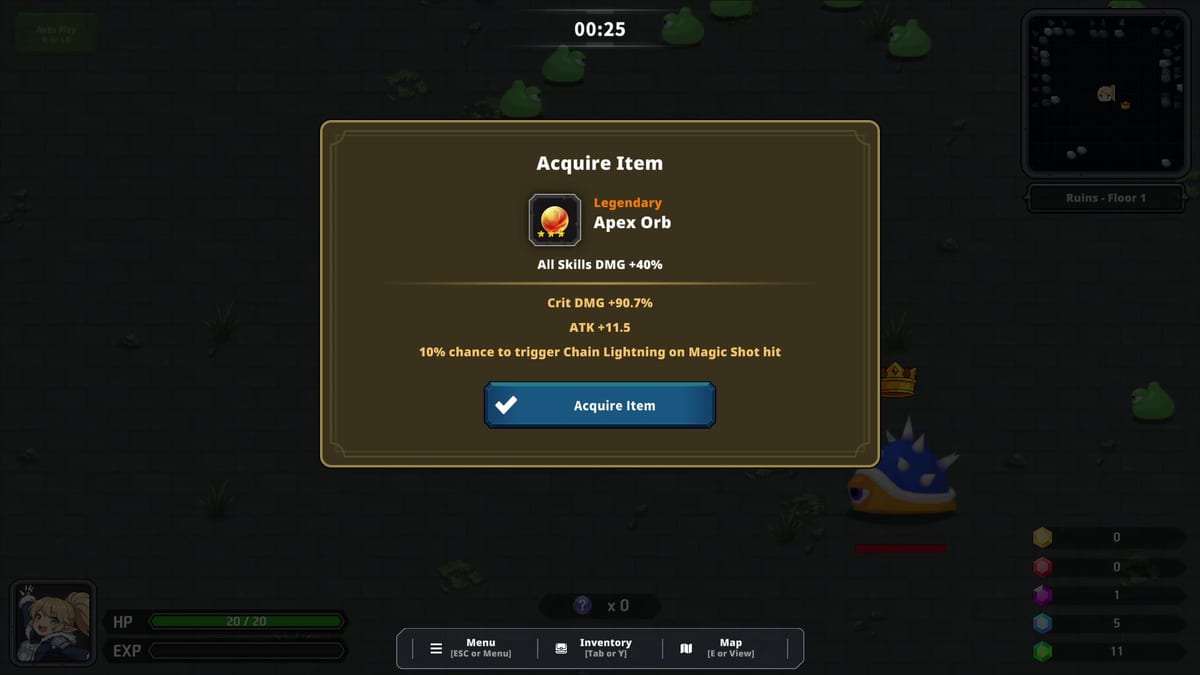
Before and immediately after Limitless Survivor’s July 24, 2026 Steam launch, Tam Lab published quality-of-life updates targeting Prestige clarity, Artifact safety during crashes, and performance during dense drop sessions. These changes are easy to overlook because they are not flashy balance numbers like patch 1.0.02’s +67% Artifact rate — but they directly affect how you farm Yellow Crystals, appraise loot, and survive long AFK blocks.
This page collects Prestige- and Artifact-related QoL in one place. Use it alongside How to Prestige, Artifacts, and Crash and Stability.
Prestige notification in dungeons
Tam Lab added a notification while in dungeons when you hold enough Yellow Crystals to purchase the next Prestige tier.
Why it matters:
- Prevents accidental “I could have Prestiged hours ago” idle waste
- Surfaces readiness during auto-play without constant menu checking
- Does not auto-Prestige — you still confirm deliberately in the Prestige panel
Treat the alert as a suggestion. Open the menu, read exact Artifact and crystal bonuses for the next tier, then decide using Prestige Planner logic. Patch 1.0.02 doubled Yellow drops, so notifications arrive sooner than demo-era pacing — see Patch 1.0.02 Balance.
Unidentified Artifacts save on pickup
Unidentified Artifacts now save immediately on pickup instead of waiting for appraisal completion.
Crash and menu-exit protection:
- Sudden client exit during long sessions loses current run progress, not necessarily picked-up Artifacts
- Returning to title screen accidentally is less punishing during appraisal flows
- Pairs with July 2026 crash reports — Crash and Stability
Permanent Artifact stacks still require successful account saves. Do not treat immediate pickup save as invincible — supervised sessions remain wise until 1.0.05 stability is proven on your hardware.
Skip Artifact Appraisal animations
Tam Lab added the ability to skip Artifact Appraisal animations for faster farming loops.
Enable or use skip when:
- AFK farming produces large Artifact batches
- Menu animation load contributes to session fatigue
- You prioritize throughput over presentation
Skipping does not change drop rates — only UI time. Combine with render caps below for smoother sessions.
Artifact render and entity caps
Launch QoL included performance safeguards:
- Maximum 20 Artifact effect renders on screen at once
- Maximum 150 dropped Artifacts existing simultaneously in one dungeon
These caps reduce VFX and entity pressure that contributed to extended-session instability. They interact with patch 1.0.04 temporary VFX removal — missing sparkle effects do not mean failed drops. Verify via results screens and inventory.
Full Artifact rules: Artifacts and How to Farm Artifacts.
Crystal display and edge drop fixes
Parallel QoL news fixed:
- Crystal values displaying incorrectly in some UI states
- Item drops near map edge repositioned inward for practical pickup paths
Pickup range still dominates collection efficiency — especially after Prestige resets — see Stat Upgrade Priority and Beginner Mistakes.
Boss auto-collection
Defeating a boss automatically collects nearby crystals and Artifacts on the field. This reduces manual vacuuming during Time Limit pressure on boss checks — relevant for Hard and Extra Floors pushes.
Relationship to later patches
| Patch | QoL overlap |
|---|---|
| 1.0.02 | Doubled Yellow drops — prestige notifications trigger sooner |
| 1.0.03 | Ctrl/RB bulk stat upgrade after Prestige — Bulk Stat Upgrade |
| 1.0.04 | VFX removal + achievement fixes during same crash push |
| 1.0.05 | Unity 6000.3 engine stability |
Daily farming workflow using QoL features
- Farm Floor 7+ Normal until Prestige notification appears
- Review next tier bonuses before confirming reset
- Bulk max pickup, Time Limit, HP via 1.0.03 controls
- Enable appraisal skip for Artifact-heavy routes
- Keep AFK sessions under personal crash threshold until stability proven
- Trust pickup save but still checkpoint via menu between overnight blocks
Related pages
- How to Prestige — full reset workflow
- Updates Hub — chronological patch index
- Patch 1.0.02 Balance — economy changes
- Auto-Play Guide — AFK setup using QoL tools
Prestige QoL updates remove friction from Limitless Survivor’s core loop — use notifications and pickup saves to farm smarter, not blindly.
Frequently Asked Questions
Quick answers to the most common questions.
Does the Prestige notification auto-reset my progress?
No. It alerts you when you can afford the next Prestige tier. You still confirm manually in the Prestige menu.
Are Artifacts safe if the game crashes during appraisal?
Unidentified Artifacts save on pickup, reducing loss risk. Current run floor progress may still be at risk until the client saves state.
How do I skip Artifact Appraisal animations?
Tam Lab added a skip option in the appraisal flow. Enable it in settings or use the skip control when appraising batches.
Why cap Artifact effects at 20 renders?
Performance and stability during dense drop sessions. Gameplay drop rates are unchanged.
Do bosses auto-collect all loot?
Boss defeats auto-collect nearby crystals and Artifacts on the field per Tam Lab QoL notes.